← All projects

07 / Declutter files

Sorted: AI File Organizer

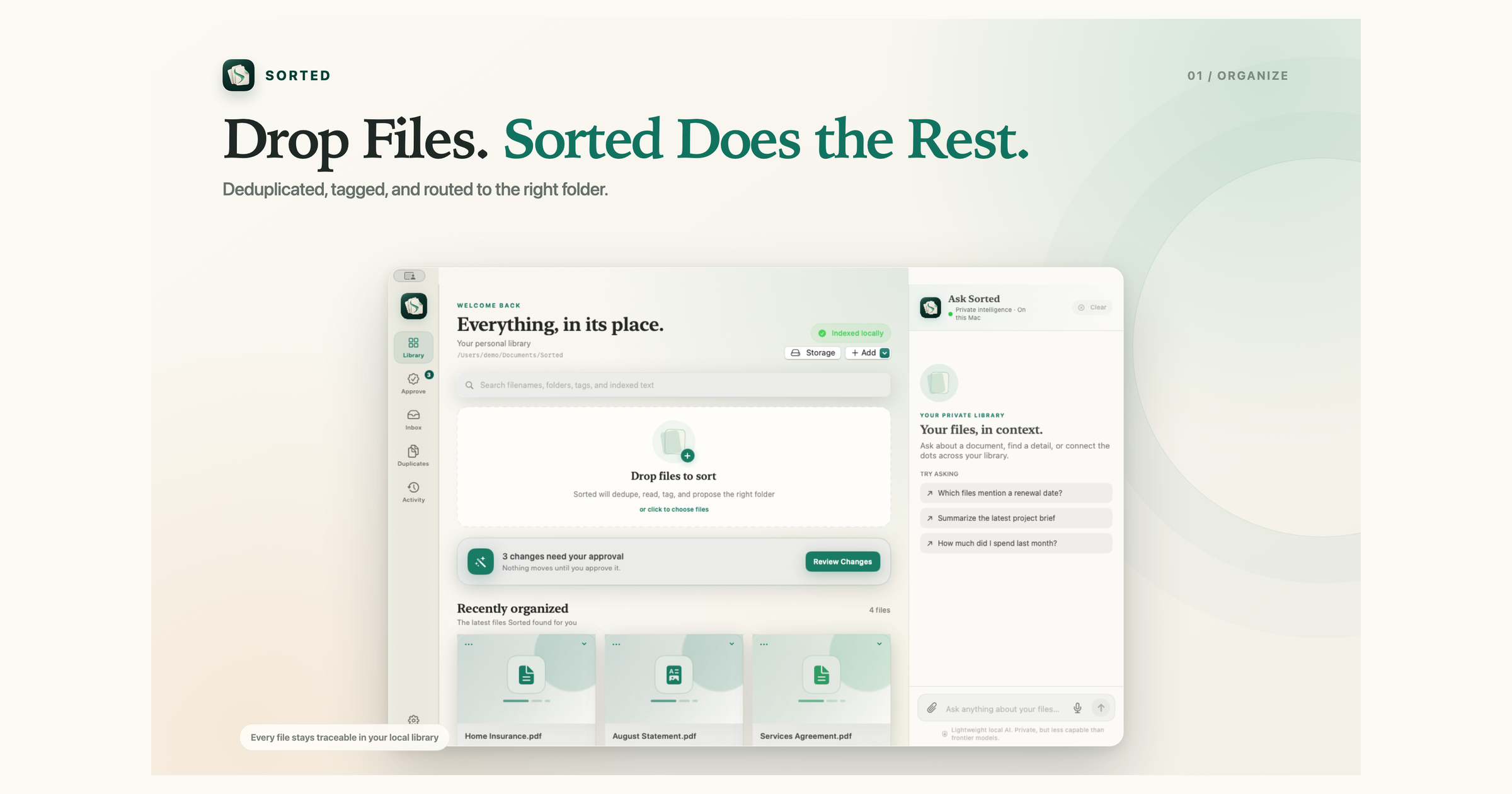
Sorted turns scattered files into a private local library that keeps organizing itself. Watch folders for new arrivals, extract PDFs, scans, images, and Office documents, find exact and visual duplicates, apply custom rules, search by meaning, ask follow-up questions with citations, and export reviewable tax records.

Sorted product screen showing a file drop becoming an organized, searchable local library

Built for the files
you actually keep.

Sorted is for the everyday archives that grow faster than anyone can maintain them. Start with the mess you already have, then keep it from coming back.

01

The Downloads folder you avoid opening

Receipts, screenshots, statements, and files named scan_0042.pdf keep piling up because sorting them by hand is never the urgent task.

Drop the backlog into Sorted. It reads the content, adds useful tags, finds duplicates, and proposes a clear destination only when a separate folder is useful.

Example requestFind the insurance document with a renewal date.
02

Tax season without the scavenger hunt

Receipts, invoices, statements, and transaction records are split across years, accounts, and inconsistent filenames.

Collect financial documents in one local library, review extracted transactions, and export a Tax Pack with the source documents your accountant needs.

Example requestHow much did I spend on Instacart in the latest statement?
03

Personal records you can actually retrieve

Medical summaries, insurance declarations, licenses, and vehicle documents are easy to keep and surprisingly hard to find later.

Search by what a document means, not what it was named. Ask for a provider, policy limit, visit date, or renewal detail and open the cited page to verify it.

Example requestWho was my medical provider, and which document says so?
04

Client and project files with clear boundaries

Contracts, briefs, invoices, and deliverables from multiple clients end up sharing the same inbox and the same vague filenames.

Create custom rules for the choices that must always win. Route files to a destination, add tags, and keep uncertain model suggestions in the approval queue.

Example requestMove contracts into the client folder and tag each one with its client.
05

Folders that stay organized after cleanup day

A one-time cleanup helps for a week. Then Downloads, scans, and shared folders start filling up again.

Watch the folders you already use. New files are copied into the Sorted library and processed by the same rules, while the originals remain untouched.

Example requestWatch Downloads and organize new financial documents automatically.
06

Duplicate cleanup without guesswork

Copies hide behind renamed files, exported versions, and visually identical images, so deleting by filename alone is risky.

See exact and visual duplicate candidates together, compare their locations, and decide what to keep with the surrounding context still visible.

Example requestShow me duplicate documents and visually matching images.

From file drop
to cited answer.

Each feature is designed around control: local processing, visible evidence, explicit rules, and a history you can reverse.

01

Content-aware file organization

Sorted reads supported documents instead of relying only on filenames. It uses extracted text, file metadata, tags, and your library structure to understand what a file is and where it belongs.

  • Drop individual files or a mixed backlog
  • Add destinations only when separate organization is useful
  • Keep the source file traceable from every organized item
02

Semantic search by meaning

Search filenames, folders, tags, and indexed document text in one place. Local embeddings connect natural-language searches with relevant files even when the exact words are different.

  • Find a document without remembering its filename
  • Search across OCR text from supported scans
  • Rebuild the local index when the embedding model changes
03

Ask questions with citations

Ask Sorted sends the question together with retrieved document context to the local answer model. Continue with follow-up questions by text or voice, and verify every answer through its source file and page.

  • Ask across PDFs and other indexed documents
  • Continue a conversation with source-aware follow-ups
  • Ask with the microphone using local speech recognition
  • Open the exact cited PDF page
  • Get a clarification or an honest abstention when evidence is weak
04

Custom rules and confidence controls

Build custom organization rules around the way you already file. Choose the conditions, move matching files to a destination, add tags, and decide whether high-confidence suggestions can run automatically. Your rules run before model suggestions and always take priority.

  • Match by file details, extracted content, or category
  • Move files, add tags, or combine both actions
  • Create destination folders only when separate organization is needed
  • Approve, edit, compare, or reject uncertain suggestions
05

Watched folders

Connect Downloads, scans, or another folder you use every day. Sorted recursively detects new and changed files and runs the same deduplication, extraction, indexing, rules, approval, and activity workflow without changing the watched source.

  • Use more than one watched source
  • Enable, pause, rescan, or remove each watch
  • Restore watched folders after relaunch
  • Keep unsupported formats searchable by filename, path, and tags
06

Exact and visual duplicate detection

Sorted identifies byte-for-byte copies and visually similar files that ordinary filename checks miss. Candidates stay reviewable so cleanup remains a deliberate choice.

  • Catch renamed copies
  • Find visually matching images and scans
  • Compare paths before deciding what to keep
07

Tax Pack export

Turn receipts, invoices, and account statements into a reviewable tax workspace. Ask for totals, counts, averages, lists, or merchant and monthly summaries while every extracted transaction remains connected to its source.

  • Review documents and transactions before export
  • Group tax records by year
  • Reveal the original source whenever a value needs checking
  • Export originals, document and transaction CSVs, hashes, activity history, and a needs-review queue
08

Activity history and undo

Every organized file, manual move, tag, rule action, and export remains visible in a local activity trail. You can understand what changed and reverse an organization action when needed.

  • See when and why a file moved
  • Distinguish automatic and manual actions
  • Undo reversible changes from the activity view
09

Private, on-device AI

Document extraction, embeddings, search, and answers run on your Mac. Sorted does not require an account, and your file contents, questions, and local index are not uploaded to a Sorted server.

  • Models are stored and run locally
  • A lightweight answer model keeps the workflow private
  • Citations make every important answer checkable
10

PDF, scan, image, and Office extraction

Sorted makes more than PDFs searchable. Local extraction covers scanned pages and images with Vision OCR, plus Word, PowerPoint, Excel, CSV, Markdown, JSON, RTF, source code, and plain text.

  • Preserve page, slide, sheet, and section context when available
  • Preview PDFs with PDFKit and other supported files with Quick Look
  • Keep unsupported formats discoverable through filename, path, and tags
11

Resilient imports and library recovery

A real processing queue keeps large imports responsive and isolates failures. Cancel or retry work, reconnect files moved outside Sorted, report missing or unmanaged items, and rebuild the local search index without losing originals.

  • See queued, processing, completed, cancelled, and failed states
  • Retry individual failures without restarting the whole import
  • Check library health and reconnect moved files by content hash
  • Reveal files in Finder or copy their exact path

Compare first.
Choose honestly.

See where Sorted fits, where another product is stronger, and which workflow makes sense for the files you actually manage.

Install Sorted on your Mac and turn scattered documents into a searchable local library.

Version 1.0.1 for Apple silicon Macs running macOS 14 or newer. Signed with Developer ID and notarized by Apple.