← All projects

01 / Local privacy gate

Hushmark

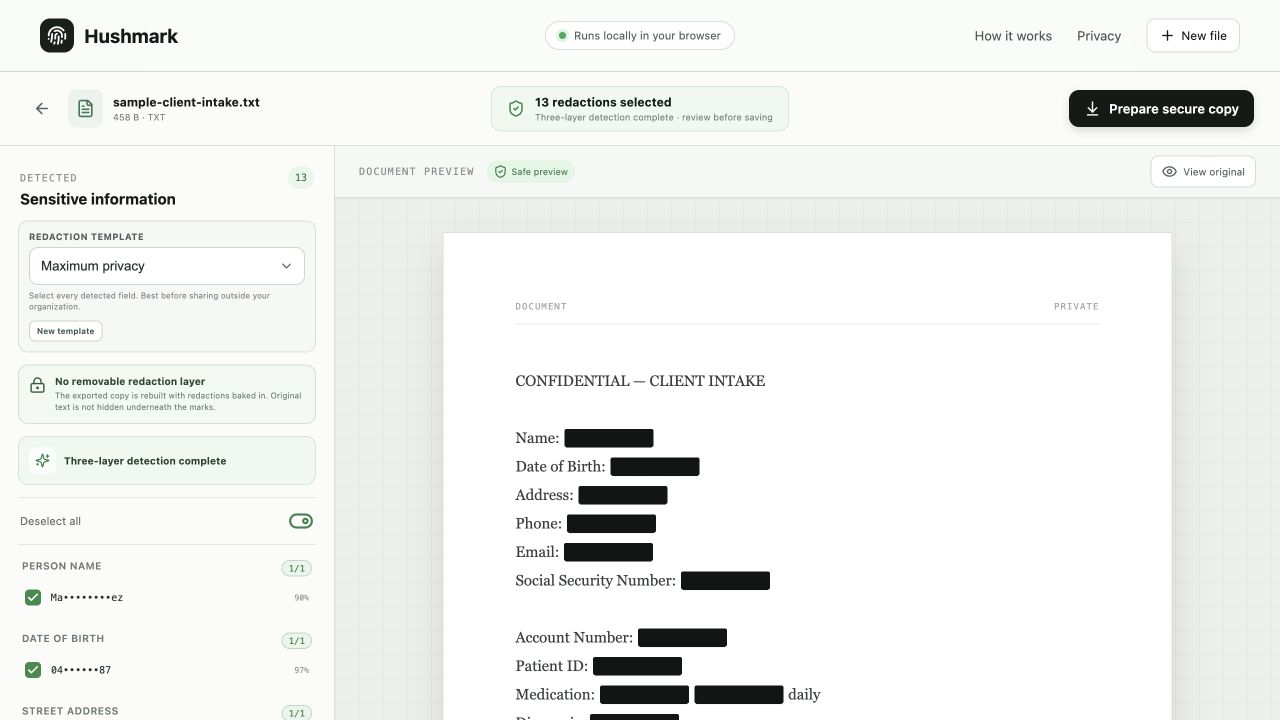
Hushmark turns a nervous handoff into a calm review. It detects sensitive information locally, lets you inspect every finding, and exports a secure copy. The Mac app also processes multiple files into a folder you choose.

StatusLive web beta
CategoryPrivacy tooling
Started2026
Hushmark document review interface showing selected redactions and a safe preview
Interface evidence / hushmarkSource capture · 2026

Make the
mechanism
visible.

Built for the moment before you paste a document into an external model. The web app is now available as a local-first beta. Hushmark turns a nervous handoff into a calm review. It detects sensitive information locally, lets you inspect every finding, and exports a secure copy. The Mac app also processes multiple files into a folder you choose.

  • Choose the browser version or install the Mac app
  • Mac batch mode processes multiple files into a secure folder
  • Files stay on your device in both versions
  • PDF, DOCX, TXT, and HTML support
  • Three-layer detection with review before export
  • Manual blackout areas for anything automation misses

Use the browser version for one file, or install the Mac app to redact multiple files into a secure folder. Both process documents on your device.

Universal preview for Apple Silicon and Intel with batch redaction. This build is not Apple-notarized. Installation help is below.
Mac says Apple could not verify Hushmark?Show installation steps ↓

The current preview is not notarized by Apple. Only continue if you downloaded it from hushmark.shrikar.dev and accept that limitation.

  1. After trying to open the disk image, click Done on the warning.
  2. Open Apple menu → System Settings → Privacy & Security.
  3. Scroll to Security and click Open Anyway. It is available for about one hour after the blocked attempt.
  4. Confirm Open and enter your Mac login password if asked.
  5. Install Hushmark. Repeat these steps if macOS blocks the app itself.
macOS Privacy and Security settings showing the blocked Hushmark disk image and the Open Anyway button
Find the blocked Hushmark disk image under Security, then select Open Anyway.

Do not disable Gatekeeper or run a Terminal command.

Read Apple’s safety guidance ↗

Before you
install.

Which version should I use?+

The browser version starts immediately for one file. The Mac app packages the local workflow on your computer and adds batch redaction for multiple files. Both versions process documents on your device.

Why does macOS show a warning?+

The current preview is not notarized by Apple yet. After the first blocked attempt, open System Settings → Privacy & Security and choose Open Anyway. The screenshot and full steps are above.

Do my documents leave my device?+

No. Hushmark processes files locally and does not require an account or upload document contents to a Hushmark server.

What files are supported?+

PDF, DOCX, TXT, and HTML files up to 25 MB or 500,000 characters. Always review the findings and saved copy before sharing.